Crafting Authentic Style with Leather Bracelet Templates
There’s a certain tactile quality to leather that instantly communicates durability, heritage, and a rugged sense of style. In the world of digital design and physical crafting, capturing that texture can be challenging, but having the right assets makes all the difference. This collection of leather bracelet templates is designed to bridge the gap between digital precision and handmade aesthetics. These aren't just static images; they are comprehensive vector files intended for creators who want to produce tangible, high-quality leather goods using cutting machines like Cricut or Silhouette, or for designers needing that specific texture for branding projects.
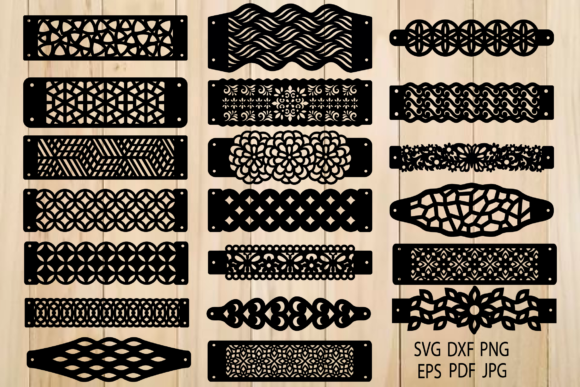
The core appeal of these templates lies in their versatility and the specific file architecture provided. When you download the package, you receive a zip archive packed with production-ready files. You get SVG, DXF, and EPS formats, which are the industry standards for vector cutting and scaling. This ensures that whether you are working in Adobe Illustrator, Inkscape, or your cutting machine's proprietary software, the lines remain crisp and scalable. For those working on digital mockups or social media content, the high-resolution JPG and PNG files are included, allowing you to integrate the leather bracelet aesthetic into mood boards or digital portfolios without needing to cut physical material.
Anatomy of the Design Asset: What’s Inside the File?
Understanding the structure of the download is crucial for a smooth workflow. The package is organized to give you maximum control over the final product. The creators have thoughtfully included variations that address common manufacturing needs. Specifically, you will find files designed for two distinct closure methods: one set featuring pre-made fastener holes and another set with a clean, unperforated edge. This distinction is vital for leather crafters because the method of joining the bracelet—whether using a snap, a buckle, or a simple knot—dictates the geometry of the design.
For each style, you have access to a full file containing all 20 individual elements, as well as individual files for each design. This is particularly helpful if you are working on a single project and don't want to clutter your workspace with unused vectors. The PDF files are formatted in black and span multiple pages, making them excellent for printing templates for manual cutting or tracing if you prefer traditional hand-tooling methods. Because these are vector-based assets, they serve as a premium design resource that can be modified. You can adjust the width of the bands, alter the curvature of the ends, or scale the patterns to create everything from thin bangles to wide cuffs.
Practical Applications for Designers and Entrepreneurs
While the immediate application is physical leather crafting, the utility of these templates extends far into the realm of digital design and branding. If you are a brand strategist working with a client in the fashion, outdoor, or artisanal space, these templates offer a quick way to visualize concepts. Instead of searching for stock photography, you can use the SVG or EPS files to create custom mockups. Imagine presenting a brand identity proposal where the logo is debossed onto one of these leather templates—it instantly communicates a narrative of craftsmanship and authenticity.
For social media managers and content creators, the PNG files with transparent backgrounds are invaluable. You can overlay text, typography, or other graphics onto the leather textures to create engaging Instagram stories, Pinterest pins, or website banners. The visual weight of leather pairs exceptionally well with both serif fonts for a classic look and sans-serif fonts for a modern, industrial vibe. Furthermore, small business owners can use these templates to launch a product line. By importing the DXF or SVG files into a cutting machine, you can produce inventory for an Etsy shop or local craft fair, creating personalized wristbands, watch straps, or accessories with professional consistency.
Integrating Texture into Your Visual Hierarchy
Using texture effectively is a hallmark of sophisticated design. Leather, specifically, adds a layer of sensory information to a visual composition. In editorial design or web design, using a leather element as a background or a divider can ground the layout and prevent it from feeling too sterile or overly "digital." It introduces a human element, suggesting that there is a real-world connection behind the pixels.
When incorporating these bracelet templates into your work, consider the principle of visual hierarchy. A leather texture is naturally dense and detailed, so it demands space to breathe. Pairing it with clean, legible typography is essential. If you are using the templates for packaging design, the texture can serve as a "band" that wraps around a product, serving as the anchor for the logo or essential information. This creates a focal point that draws the eye because of the contrast between the organic texture and the structured information.
Technical Considerations and Workflow Tips
To get the most out of these files, a basic understanding of vector manipulation is helpful, though not strictly necessary if you are using a consumer-grade cutting machine. The files are optimized for compatibility, but it is always good practice to check your software's import settings. When working with the SVG or DXF files in a program like Cricut Design Space, ensure that the scale is correct before sending the job to the cutter. Leather is a thicker material than paper or vinyl, so you will need to adjust your machine's settings—specifically the blade depth, pressure, and cutting speed—to accommodate the material density.
For those using these assets purely for digital design, the EPS and SVG formats allow for infinite scalability. This means you can zoom in on the texture details without pixelation, which is crucial for high-DPI print projects or large-format displays. The inclusion of JPGs and PNGs ensures that even if you aren't a vector expert, you have access to high-quality raster images that can be dropped directly into Photoshop or Canva for quick edits.
Ultimately, this collection of leather bracelet templates is more than just a set of cut files; it is a versatile toolkit for adding texture, authenticity, and a tactile quality to your creative projects. Whether you are a hobbyist making gifts for friends, a designer mocking up a brand identity, or an entrepreneur building a product line, these assets provide the foundational geometry and aesthetic needed to create something that feels substantial and professionally crafted. The availability of multiple formats and the inclusion of variations with and without fastener holes demonstrate a user-centric approach to design assets, ensuring that you have the flexibility to execute your vision exactly as you imagine it.